Google Gemini on USF Campus
What is Gemini?
USF is now offering a Gemini for Education (free plan) to all current faculty, staff and students. Students' access begins on September 1.
Gemini is a web-based AI tool that works like a highly intelligent assistant, helping you boost daily productivity, analyze business data, run complex queries, and make informed, data-driven decisions. It integrates well with our Google suite on campus.
You use prompts in Gemini to achieve the outcome you want, with options for creating slide presentations, charts and diagrams, voice podcasts, infographics, and videos. Gemini enhances your workflow, which you are already familiar with. To understand more about Gemini, click on the link below.
 Why is “Add from Drive” feature Currently Unavailable?
The “Add from Drive” option in Gemini is DISABLED for USF users due to USF’s commitment to data privacy, information security, and responsible use of artificial intelligence technologies. The restriction is designed to protect institutional, employee, faculty, staff, and student data. To further understand this, read the KB article below.
Getting Started with Gemini
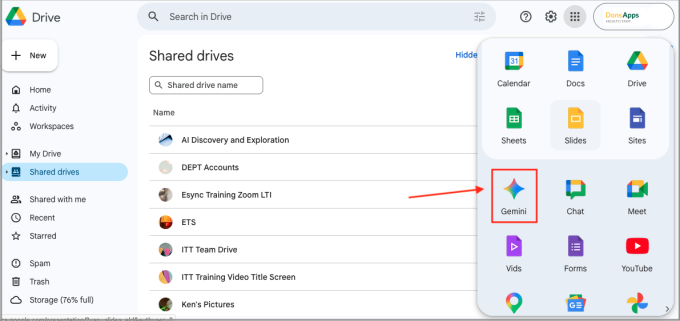
To access Gemini, first sign in to USF Gmail account. Go to My Drive, click on the More menu option on the top right (the dotted grid symbol), and choose Gemini.
Explore Features
Here are some highlights to share:
- Canvas
- Deep Research
- Guided Learning
- Gems: Custom AI experts that help you with learning, coding, creating an illustrated storybook, and more.
- Generate images with Nano Banana Pro
- Create music with Lyria 30-second music tracks from text, image, video, and files.
Data Security
To keep your data safe and responsibly use AI, please follow the Guidelines for Responsible Use of AI when using Gemini:
Only use information that is already **public** or **non-sensitive**. Do not enter any personal identifiable information (PII), sensitive personal identifiable information (SPII), or "High Risk" data into your prompts.
- With our Google Workspace for Education accounts, all data using Gemini are kept private.
- Interactions with Gemini stay within the school’s organization and are not shared with other customers or institutions without permission.
- Google does not use prompts, responses, or uploaded files to train its underlying generative AI models.
- Chats are not reviewed by human contractors to improve the service.
- There are no ads in the Gemini experience for Education, and data is never used to create advertising profiles.
Accessibility Statement
Last updated: September 9, 2026